Sunday, June 12, 2016
Back to Coworking!
In 2011, I wrote a post about leaving the Brooklyn coworking space I'd been renting, where I'd met the co-founder of Plover, where I'd done my first stint of remote captioning, and where I'd spent many happy months in the company of other freelancers and entrepreneurs. That coworking space no longer exists, sadly, though I learned recently while listening to the podcast Startup that the same building housed the first offices of Gimlet Media, which was a disorienting coincidence. These past five years, I've had a home office in a huge two-bedroom apartment (with seven closets and an eat-in kitchen!), and it's been wonderful. I've done a fair bit of remote captioning in that office, though the majority of my work has been onsite since we moved here. That's all about to change, though. This Saturday, we'll be moving to a much smaller 2-bedroom apartment about 20 blocks downtown, with only two closets and a nice but narrow kitchen. We're downsizing almost everything -- ditching our kitchen table, buying a smaller couch, getting rid of hundreds of books plus several bookshelves, and leaving behind our three beautiful desks, which won't fit in the new space. The new space, you see, won't have a home office, because the second bedroom will be used as... A bedroom.
Yup. We're having a kid. He's due in August. I'm currently trying to switch most if not all of my captioning work from onsite to remote so I won't have to spend 8 or more hours a day out of the apartment like I have been for the past many years. I'm also planning to work fewer hours in general, at least until we get our feet under ourselves as parents. That'll probably mean spending down some savings, but I can't think of anything I'd rather spend it on. The trouble with captioning, though, is that it doesn't coexist well with screaming babies, and there's hardly space in the new apartment to set up my equipment anyway. So starting July 1, I'll be hotdesking at Harlem Collective, a fantastic new coworking space that opened just a few months ago on 152nd Street. It's got 24-hour access, which is perfect for the early-morning overseas conferences I sometimes find myself captioning, and with luck, it'll only take me about 15 minutes to get there from my new apartment, which means I won't have to be away from the kid for long. I'm a little sad about losing my home office space, but I'm so excited to start this new adventure.

Tuesday, April 12, 2016
Support The Future of Steno!
This poor blog has been sadly neglected lately, but someone pointed out that I should probably alert its readers to the ongoing crowdfunding campaign we're currently running over at The Open Steno Project. I mostly post about Open Steno Project stuff over at The Plover Blog, which is targeted towards steno amateurs and hobbyists rather than professionals. This blog, by contrast, mostly assumes an audience of professional captioners like me. It's a small group of people (only 465 Certified Realtime Captioners in the United States, according to the NCRA Online Sourcebook!), but one that's obviously extremely close to my heart.
So here's my appeal, addressed to any of my colleagues and future colleges who might read this blog.
The number of people who can use a steno machine has been trending gradually but inexorably downwards for a very long time. Machine steno used to be taught in high schools, secretarial schools, anywhere it might be useful for someone to learn a faster method of transcription than longhand, pen shorthand, or typewriting. Manual steno machines were inexpensive and plentiful. They could be bought on a whim. Some people who learned machine steno studied it diligently enough to become professional court reporters. Others, who couldn't quite match courtroom speeds, used them to take dictation. Some probably just learned the skill for fun, or in case it might become useful at some point in the future.
Then came the 1980s, when for the first time you didn't need to transcribe your steno notes into English for them to be useful. Computers were able to do that for you. That's when steno went on lockdown, and that's when the decline began.
Instead of $30 for a machine and a short self-study course or a few semesters at a trade school, you suddenly needed to pay thousands of dollars for hardware and software. Trade schools became eligible for Federal student loan money and started charging up to $20,000 a year for court reporting programs, despite the fact that, as always, there was an 85% dropout rate from court reporting programs. Steno was no longer something people could pick up and teach themselves on a whim. You had to pay dearly just to give it a try, and if you weren't in the 15% that got to professional court reporting speeds, the price of failure was enormous.
Most professional stenographers -- court reporters and captioners -- know all of this already.
But what we don't always admit to ourselves is that if we don't drastically change something, our profession won't continue to exist in the future. Our technology is by far the fastest and most accurate means of turning human speech into realtime text, but if fewer and fewer people continue to learn how to use it, our deaf and hard of hearing clients will have to settle for whatever accommodations are available to them.
Some people have proposed initiatives to get more high school students into steno schools, but that seems ill-advised to me. Is it ethical to encourage kids to spend huge amounts of money on software, hardware, and schooling, even if most of them might not have the baseline fine motor skills or literacy skills or dedication or determination or whatever ineffable thing ensures that they become one of the successful 15%? However you cut it, those are not good odds.
Wouldn't it be better to give a huge number of people the opportunity to develop baseline steno skills first, without any real risk or financial barriers, and then let the best and brightest of that number continue on to professional careers, while the rest float along happily at a hobbyist or amateur level, writing at 140 to 160 words per minute and ecstatic to have doubled their qwerty speed? A huge number of people spend their days entering text at a computer. Why not give them the opportunity to do that more quickly and efficiently? Why should this machine only be considered useful at speeds above 200 WPM?
This is the reason for the Steno Arcade campaign.
Over the last five years, about 500 people have attempted to teach themselves steno using $40 to $200 hardware and our free online textbook. Many of them have succeeded and are delighted with their new skill. A precious few of those have gone on to professional certification as realtime captioners or court reporters. 500 people isn't bad, but we could reach so many more.
In the time since we launched the playable demo of Steno Hero on Steam, we've had over 5,000 downloads. 5,000 people have gotten a taste of our game, and most of them love it!
Not everyone wants to teach themselves a new skill out of a textbook.
Many, many people learn new skills every day by playing video games. Often that skill is just "be better at this specific video game", but people have learned how to play guitar, how to draw, how to fly an airplane, and, of course, how to touch-type.
Any skill that requires repetitive practice of granular movements that start easy and gradually increase in difficulty can be taught and reinforced with a video game. Steno meets these criteria beautifully.
That's why we're building a free video game suite to teach steno. Our software is already free. Our hardware is already affordable. Two of the three barriers that were built against free and widespread access to steno in the early computer age have already toppled. The only piece left is education.
If you contribute to the Steno Arcade campaign, you will help bring steno into the living room of a middle schooler, high schooler, college student, or career-pivoting young adult. They'll pick it up on a whim, just as people did with those big, heavy manual machines nearly a century ago, and they'll give it a try. They'll start out slow and awkward, gradually pick up speed, eventually find that they're writing faster on their steno machine than they ever managed on their qwerty keyboard, and a few of them will decide that they want to pursue the breathless rush of turning words to text at 200+ WPM as a career.
Short of this, I don't see the trajectory of our profession changing in any meaningful way. Fewer people will enter steno schools. Most will drop out. Those that succeed will see their colleagues retiring around them without anyone younger coming in to take their place.
I love steno with all my heart. I don't want to see that happen. If you care about this technology and this profession, please consider contributing to the Steno Arcade campaign, or at least spreading it around to friends, colleagues, and potential future colleagues. If we can make this happen, we can turn that trajectory around and make sure that our jobs and the clients who rely on them are supported and secure, well into the future.
Be a Steno Hero! Help us build Steno Arcade!

Thursday, October 8, 2015
A11ycampNYC Presentations
I captioned half of a11ycampNYC a few weekends ago, switching off with the illustrious Stan Sakai. I also gave two presentations, one five-minute lunchtime demo that I captioned myself, and one full-length presentation that Stan captioned. Eventually I want to upload this with fully edited, properly timed captions using Amara, but I thought I'd post the provisional versions for now, just so they're out there. If you'd like to see the other presentations that day, all with recorded (unedited) live captions, check out The Internet Society's recording archive.
Here's my five-minute steno demo:
And here's my talk, The Three Prongs of Steno Accessibility:
Stenographic technology has been used to provide realtime captioning for over 25 years, but two other important potential applications of steno for accessibility are less well known: 1) As a way to rectify the catastrophic levels of underemployment in the blind/low vision community (especially those who use screen readers and are already comfortable processing speech at over 300 WPM) by making it possible for them to become professional realtime captioners, and 2) By integrating it with text-to-speech technology to allow for a truly conversational speech synthesis system for AAC users. In this session, I'll discuss these three potential applications and the way they intersect.
Many thanks to Stan for captioning me and to Thomas, Shawn, and Cameron, the organizers of a11ycampnyc and of the ongoing a11ynyc Meetup group! It was a fantastic experience.
Here's my five-minute steno demo:
And here's my talk, The Three Prongs of Steno Accessibility:
Stenographic technology has been used to provide realtime captioning for over 25 years, but two other important potential applications of steno for accessibility are less well known: 1) As a way to rectify the catastrophic levels of underemployment in the blind/low vision community (especially those who use screen readers and are already comfortable processing speech at over 300 WPM) by making it possible for them to become professional realtime captioners, and 2) By integrating it with text-to-speech technology to allow for a truly conversational speech synthesis system for AAC users. In this session, I'll discuss these three potential applications and the way they intersect.
Many thanks to Stan for captioning me and to Thomas, Shawn, and Cameron, the organizers of a11ycampnyc and of the ongoing a11ynyc Meetup group! It was a fantastic experience.
Thursday, August 27, 2015
Help Crowdfund Captioning And Interpreting for Polyglot NYC!
Polyglot Conference NYC 2015 is looking for funding so that they can pay for captioning of two simultaneous tracks plus full interpreting teams for deaf attendees. Ellen Jovin, the organizer of the conference, writes:
Polyglot Conference NYC 2015 will bring hundreds of polyglots and language enthusiasts from around the world to New York this October for two days of wide-ranging language talks. Speakers include the inventor of the language Dothraki for the HBO hit Game of Thrones, multiple polyglots who speak 6+ languages, New York’s own celebrity teen polyglot Tim Doner, linguist-writer John McWhorter, representatives of major language-learning publishers, and many others. We will have exhibitors, book-signings, goodie bags for participants, and the sharing of absolute mountains of inspiring and useful information.Please spread the word as far and wide as you can, and know that if you chip in a few dollars, you'll be able to see all the captioned conference videos online afterwards! I'd really love to be able to be one of the captioners at this conference. It looks absolutely amazing.
As part of our event, we are crowdfunding to pay for interpreter and live captioning services. The plan is to record the conference talks, then convert the live captioning later so that it can be used on videos available online to the deaf and hard of hearing, as well as polyglots and language enthusiasts around the world who do not speak English natively and might appreciate having a written transcript to supplement the audio/video. People who will benefit include many enthusiasts who wish to attend the New York conference but can’t afford it, or who have disabilities making travel impossible or difficult, or who are unable to obtain visas. If you know anyone who would be willing to contribute, we would be most grateful, as we want to spread information globally about the joys and value of language-learning to as many people as we can. Richard Simcott, who appears in the video, is a co-organizer and speaks 16+ languages. He is unbelievably gifted and a real leader in the polyglot community.
Thursday, August 13, 2015
2015 NCRA Convention Wrap-Up
It's already been a little while, but I just wanted to blog about the NCRA convention while it was still somewhat fresh in my memory!
It all started on Thursday. I got there early, set up the Open Steno Project table, and then headed over to the Realtime Contest. I'd never competed before, and I knew that test nerves were definitely going to be a problem, but I wanted to give it a shot. Since I've never taken testimony in my life, I didn't care much about the Q&A (and, predictably, I bombed it), but I managed to struggle through a halfway decent Lit that sounded smooth and almost ponderous to my ears, but was thwarted by my thumping heart and jittery fingers. Later I found that I came in at 11th place, which was good enough that I wasn't totally disappointed in myself, but not quite good enough to be satisfied. Next time, whenever that may be, I'm gonna aim for top five.
After the test, I met up with some of my long-time steno Twitter buddies for a food crawl. From right to left: nerd_for_words, @mscourtreporter, her husband @chefie_b, his cousin (dunno if she has a Twitter), me, and StenYes, plus two photobombers in the back. Not pictured: The charming but elusive depo reporter @chr1st0p43r.
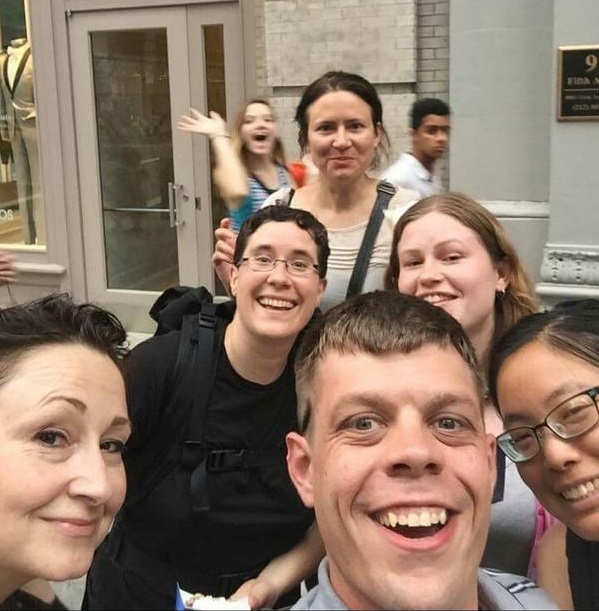
We had everything from banh mi to roasted okra to bubble tea to vegan sushi to waffles to black sesame milkshakes to deep-fried shrimpy radish cubes, and it was all AMAZING.
Grinning and replete, I rolled home and into bed to prepare for the next day.
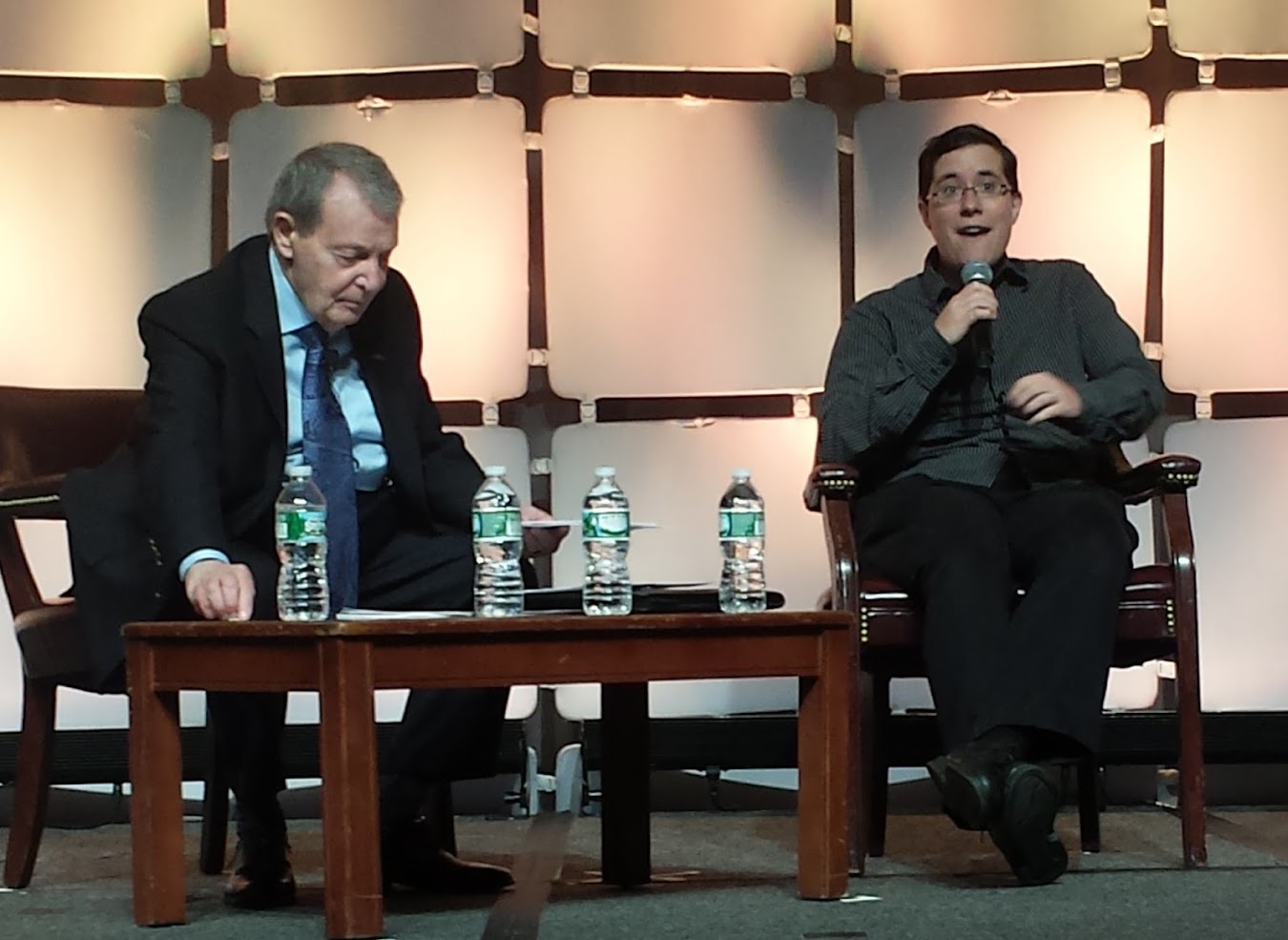
Friday morning, I got to speak a bit about the Open Steno Project at the opening session (here's me being an excitable dork about steno, with Dom Tursi looking less than impressed):
And then spent the rest of the day manning the Open Steno Project table with Josh Lifton, Plover's first programmer and inventor of the Stenosaurus, which should hopefully be coming out in the next few months! Stan helped out too, which was awesome, since he's Plover's first and most illustrious success story. He started on Plover way back in 2010, then wound up teaching himself steno and becoming a Certified CART Provider without ever setting foot in a steno school.
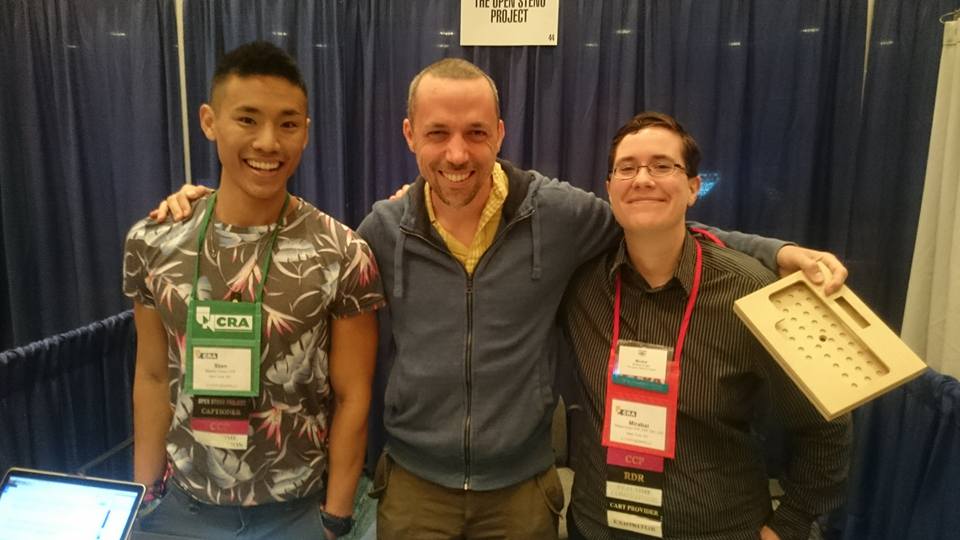
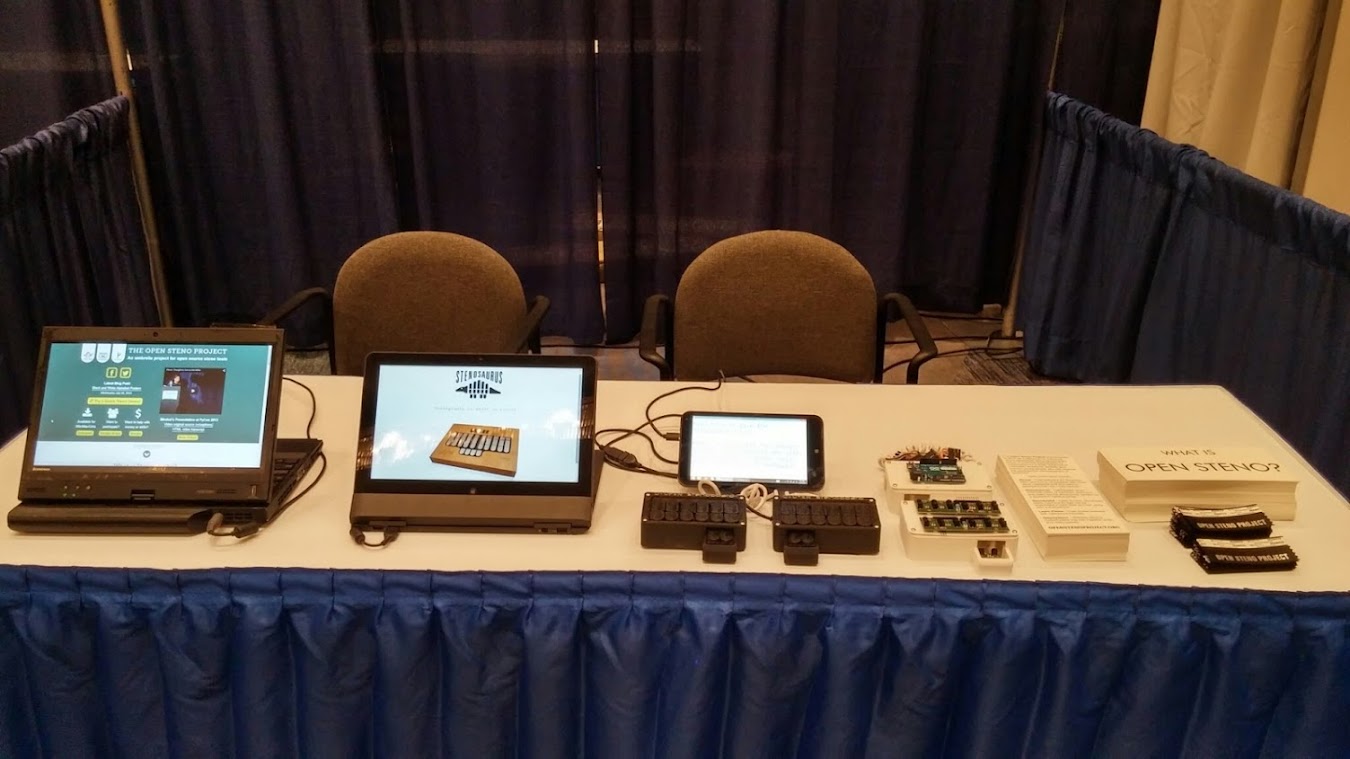
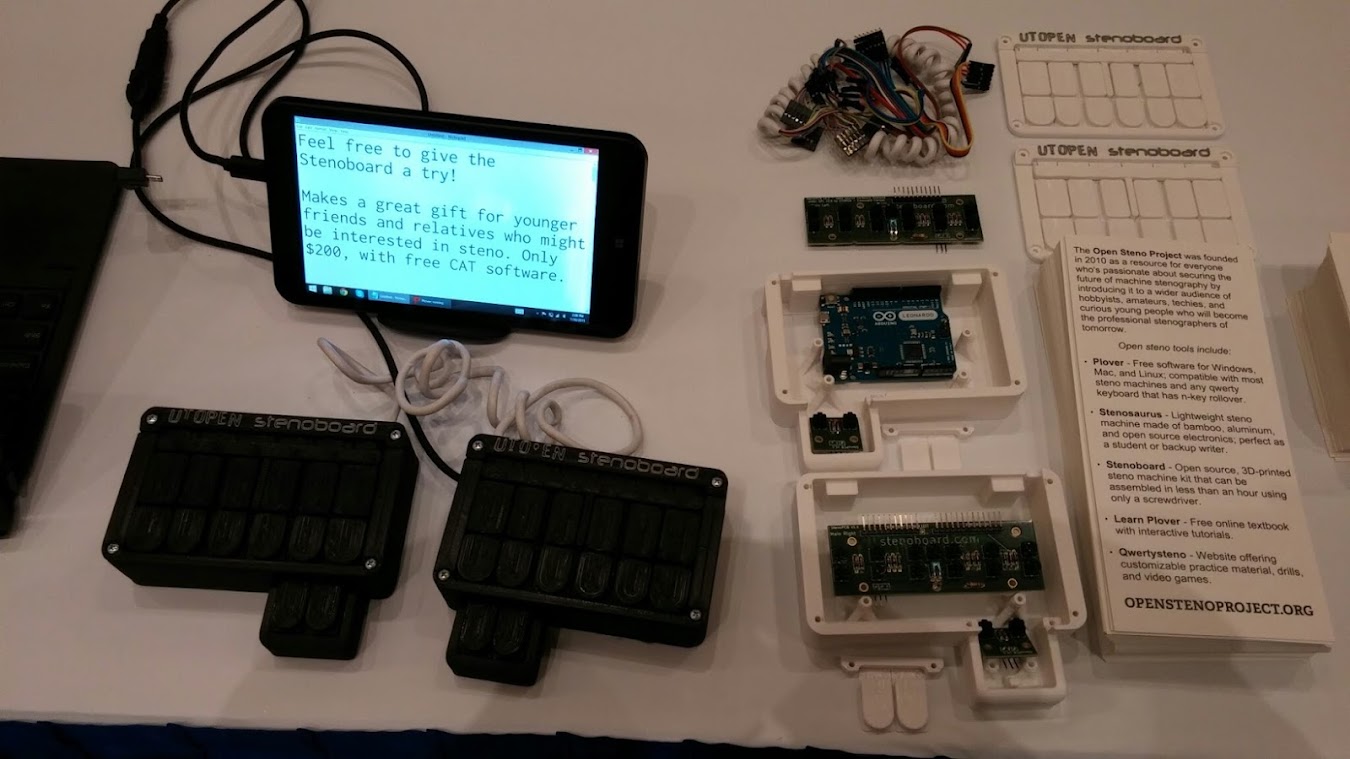
We got a lot of great questions about Open Steno, and several people signed up for the Stenosaurus mailing list or said that they were gonna buy a Stenoboard kit for a younger relative who might be interested in steno, which made me really happy.
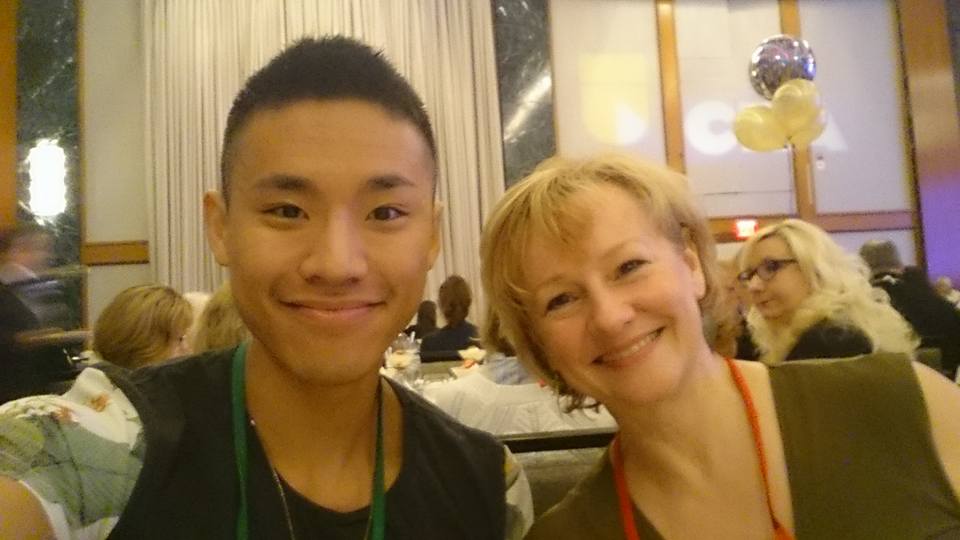
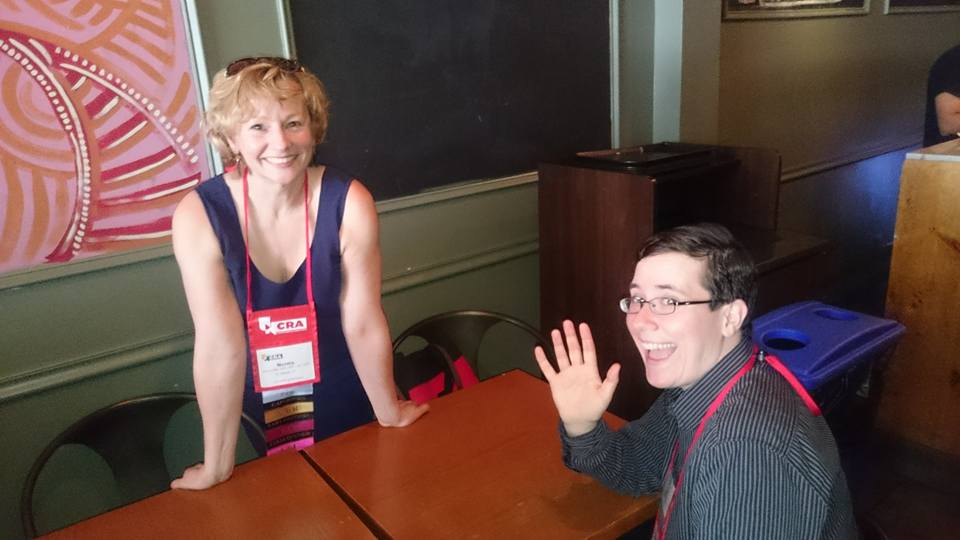
Then the White Coat Captioning team (Stan and me plus our fearless leader Norma Miller) assembled for one of our rare but always delightful in-person meetups. We had delicious Indian food for lunch, and got to indulge in our favorite pastime: Talking shop.
That night we went to the CART/Captioning Reception, and then straight on to the screening of For the Record, which Stan starred in alongside other steno luminaries. At the end they all got up on stage and answered questions, and it was a heck of a good time.
I hadn't managed to go to any sessions on Friday because I'd been so occupied with the Open Steno Project table, but I was kicking myself after Norma told me how amazing she'd found the seminar on Creative and Critical Captioning. I mean, just look at this description:
I also got to help out with the Tech Connection session, talking up the TextOnTop system, which now offers automated multilanguage translation and (even more exciting in my book) a micro-USB dongle that works in small tablets such as the HP Stream 7.
Finally it was time for my own session, Advanced Topics in CART. I was pretty worn out by then, but that was okay, because it was much more of a collaborative discussion than a presentation per se. We voted on which subjects were most interesting to the assembled crowd, and came up with the following four areas, which more than filled up the time:
* Proactive conference captioning: How to get conferences to offer captioning without a specific request from a deaf or hard of hearing attendee. We talked over various options, such as putting together compilations of positive feedback for captioning from previous conferences and transmitting them via Storify, asking organizers to conduct audience surveys and write blog posts after each conference, retweeting pro-captioning comments from the conference hashtag while the conference is going on, allowing attendees to get a crash course in steno by playing on our steno machines during breaks, and someone even brought up the possibility of contacting venues such as hotels and convention centers rather than conference organizers themselves, with the thought that if they had a standing resource for captioning, they might be able to reach an even broader sector of conferences. Very promising stuff.
* One-stroke googling: How to configure various types of steno software to make a single touch of a foot pedal or a particular steno stroke search for a highlighted word or name via Google on a secondary monitor. It doesn't seem like any software has this technique completely hammered down yet (Plover can sort of do it, though it's a little cumbersome), but there's high demand for it among remote captioners. Hopefully it'll be readily available across platforms in the near future.
* Dealing with dodgy WiFi: Ways to deal with a dicey WiFi connection, from trying to boost it using systems such as Speedify, trying to work with it by using bandwith-limiting caption systems that used text streaming rather than high-bandwidth screen sharing apps, or circumventing the need for WiFi altogether, when possible, by using cell phone audio, TextOnTop, wireless LANs, or Bluetooth.
* Remote caption audio troubleshooting. I asked the crowd what one element turned their daily audio from a screechy, staticky nightmare into an actual decent job. They had all sorts of answers, including buying a mixer board, pushing for the university to update the video streaming software they use for online courses, using teleconference meeting rooms with "octopus mics", and using the integrated two-mic system offered by OneInterpreting. Unfortunately I forgot to mention my own lifesaving solution for jobs involving a sound board: Making sure the computer running Skype is plugged into a USB audio coupler.
That discussion led into an even more interesting one, about the dangers of hearing loss for both onsite and remote providers. We talked about which jobs we decided to turn down for the sake of our hearing health, a few providers talked about how getting hearing aids helped them to continue the work they loved without any drop in quality, and many of us admitted that the fear that prevented us from getting baseline hearing tests was both counterproductive and potentially career-ending. It was so incredible to be in a room with dozens of my colleagues, all of us with years of experience and vast amounts of passion and knowledge for captioning, sharing tips and commiserating and getting excited about making our jobs even better. It was a magical experience, and I can't express how grateful I am to have been able to be a part of it.
After that, I had to go pack up the Open Steno Table, and by then I was too exhausted to even think about going to the dance that evening. I came home and went to bed with the best of intentions, but didn't manage to wake up in time to go to either of the Sunday morning sessions. It was a marvelous handful of days -- intense, challenging, and fun as all get out. Introvert that I am, I was completely thrilled to be able to shmooze with some of the best stenographers in the country, and to hear all their mindblowing stories. I'm not sure if I'll be able to get out to next year's convention, but I'm so, so glad I got the chance to experience this one in my own home city.
It all started on Thursday. I got there early, set up the Open Steno Project table, and then headed over to the Realtime Contest. I'd never competed before, and I knew that test nerves were definitely going to be a problem, but I wanted to give it a shot. Since I've never taken testimony in my life, I didn't care much about the Q&A (and, predictably, I bombed it), but I managed to struggle through a halfway decent Lit that sounded smooth and almost ponderous to my ears, but was thwarted by my thumping heart and jittery fingers. Later I found that I came in at 11th place, which was good enough that I wasn't totally disappointed in myself, but not quite good enough to be satisfied. Next time, whenever that may be, I'm gonna aim for top five.
After the test, I met up with some of my long-time steno Twitter buddies for a food crawl. From right to left: nerd_for_words, @mscourtreporter, her husband @chefie_b, his cousin (dunno if she has a Twitter), me, and StenYes, plus two photobombers in the back. Not pictured: The charming but elusive depo reporter @chr1st0p43r.
We had everything from banh mi to roasted okra to bubble tea to vegan sushi to waffles to black sesame milkshakes to deep-fried shrimpy radish cubes, and it was all AMAZING.
Grinning and replete, I rolled home and into bed to prepare for the next day.
Friday morning, I got to speak a bit about the Open Steno Project at the opening session (here's me being an excitable dork about steno, with Dom Tursi looking less than impressed):
And then spent the rest of the day manning the Open Steno Project table with Josh Lifton, Plover's first programmer and inventor of the Stenosaurus, which should hopefully be coming out in the next few months! Stan helped out too, which was awesome, since he's Plover's first and most illustrious success story. He started on Plover way back in 2010, then wound up teaching himself steno and becoming a Certified CART Provider without ever setting foot in a steno school.
We got a lot of great questions about Open Steno, and several people signed up for the Stenosaurus mailing list or said that they were gonna buy a Stenoboard kit for a younger relative who might be interested in steno, which made me really happy.
Then the White Coat Captioning team (Stan and me plus our fearless leader Norma Miller) assembled for one of our rare but always delightful in-person meetups. We had delicious Indian food for lunch, and got to indulge in our favorite pastime: Talking shop.
That night we went to the CART/Captioning Reception, and then straight on to the screening of For the Record, which Stan starred in alongside other steno luminaries. At the end they all got up on stage and answered questions, and it was a heck of a good time.
I hadn't managed to go to any sessions on Friday because I'd been so occupied with the Open Steno Project table, but I was kicking myself after Norma told me how amazing she'd found the seminar on Creative and Critical Captioning. I mean, just look at this description:
Composing Sound – A Workshop on Creative and Critical Captioning – Ever wonder what sparks of imagination come from the next generation of caption users and captioner creators? In this workshop, we will explore a number of creative and critical exercises for discussion about — and then the creation of — captioning as another way of thinking about writing. Immersed in digital media, social media, and multimodal texts at all times, college-age students are a part of the next generation of caption-readers and caption-makers (aka, CART-writers). Led by a university professor of college writing courses who is deaf (a CART-user herself), in this workshop we will roll up our CART sleeves and think about the creative and critical potential of captioning for the present and the future.I was crushed to have missed it, but fortunately Brenda Brueggemann, the deaf professor who led it, did another session on Saturday which I was able to attend: Making an Elevator Speech for Broadcast Captioners/CART Captioners. It was a heck of a lively session, with lots of spirited back and forth, but eventually this is what my group managed to come up with:
Public event captioning benefits everyone, including people with hearing loss, non-native English speakers, people who want to take notes, and people who find that multimodal access helps them to comprehend dense and difficult material.Professor Brueggemann conducted the session with expert aplomb, and I'd be thrilled if she would consent to come back sometime. In fact, several captioners and I have decided that we're going to petition the NCRA to make an official policy that each convention going forward will have at least one deaf or hard of hearing speaker. They're the people who can best direct us on how we should do our jobs, and their perspectives are absolutely invaluable.
I also got to help out with the Tech Connection session, talking up the TextOnTop system, which now offers automated multilanguage translation and (even more exciting in my book) a micro-USB dongle that works in small tablets such as the HP Stream 7.
Finally it was time for my own session, Advanced Topics in CART. I was pretty worn out by then, but that was okay, because it was much more of a collaborative discussion than a presentation per se. We voted on which subjects were most interesting to the assembled crowd, and came up with the following four areas, which more than filled up the time:
* Proactive conference captioning: How to get conferences to offer captioning without a specific request from a deaf or hard of hearing attendee. We talked over various options, such as putting together compilations of positive feedback for captioning from previous conferences and transmitting them via Storify, asking organizers to conduct audience surveys and write blog posts after each conference, retweeting pro-captioning comments from the conference hashtag while the conference is going on, allowing attendees to get a crash course in steno by playing on our steno machines during breaks, and someone even brought up the possibility of contacting venues such as hotels and convention centers rather than conference organizers themselves, with the thought that if they had a standing resource for captioning, they might be able to reach an even broader sector of conferences. Very promising stuff.
* One-stroke googling: How to configure various types of steno software to make a single touch of a foot pedal or a particular steno stroke search for a highlighted word or name via Google on a secondary monitor. It doesn't seem like any software has this technique completely hammered down yet (Plover can sort of do it, though it's a little cumbersome), but there's high demand for it among remote captioners. Hopefully it'll be readily available across platforms in the near future.
* Dealing with dodgy WiFi: Ways to deal with a dicey WiFi connection, from trying to boost it using systems such as Speedify, trying to work with it by using bandwith-limiting caption systems that used text streaming rather than high-bandwidth screen sharing apps, or circumventing the need for WiFi altogether, when possible, by using cell phone audio, TextOnTop, wireless LANs, or Bluetooth.
* Remote caption audio troubleshooting. I asked the crowd what one element turned their daily audio from a screechy, staticky nightmare into an actual decent job. They had all sorts of answers, including buying a mixer board, pushing for the university to update the video streaming software they use for online courses, using teleconference meeting rooms with "octopus mics", and using the integrated two-mic system offered by OneInterpreting. Unfortunately I forgot to mention my own lifesaving solution for jobs involving a sound board: Making sure the computer running Skype is plugged into a USB audio coupler.
That discussion led into an even more interesting one, about the dangers of hearing loss for both onsite and remote providers. We talked about which jobs we decided to turn down for the sake of our hearing health, a few providers talked about how getting hearing aids helped them to continue the work they loved without any drop in quality, and many of us admitted that the fear that prevented us from getting baseline hearing tests was both counterproductive and potentially career-ending. It was so incredible to be in a room with dozens of my colleagues, all of us with years of experience and vast amounts of passion and knowledge for captioning, sharing tips and commiserating and getting excited about making our jobs even better. It was a magical experience, and I can't express how grateful I am to have been able to be a part of it.
After that, I had to go pack up the Open Steno Table, and by then I was too exhausted to even think about going to the dance that evening. I came home and went to bed with the best of intentions, but didn't manage to wake up in time to go to either of the Sunday morning sessions. It was a marvelous handful of days -- intense, challenging, and fun as all get out. Introvert that I am, I was completely thrilled to be able to shmooze with some of the best stenographers in the country, and to hear all their mindblowing stories. I'm not sure if I'll be able to get out to next year's convention, but I'm so, so glad I got the chance to experience this one in my own home city.
Wednesday, July 1, 2015
Advanced Topics in CART at the 2015 NCRA Convention
Way back in 2006, I was just starting my second year of steno school when the NCRA convention came to New York City. I got myself a student membership and had a fantastic time. Over that weekend I schmoozed at the Friday night CART/Captioning reception, attended a number of interesting seminars (including the one where I learned the OEU diphthong trick as an all-purpose wildcard for briefs, which has proven absolutely invaluable over the years), had lunch with the legendary Ed Varallo, and got a small but tantalizing taste of what my future professional life might look like. I've often joked that being a realtime captioner among court reporters is like being a tailor among barbers; they both use scissors and we both use steno machines, but we all do substantially different jobs. While many seminars at NCRA conventions focus on things like transcript preparation, negotiating with law firms, advocating for official reporters in the courtroom, and other legal-heavy subjects, there tends to be a dearth of captioner-specific material. I went to the national convention in Nashville in 2013 and to TechCon in Atlanta last year, but each time most of the seminars related to CART and captioning were focused on basic 101-level "how do I stream text to clients", or "how can I switch from depo reporting to captioning" sorts of subjects.
Early this spring, I put in two proposals to speak at the 2015 NCRA convention, which will be coming back around to my own home town. The first was an introduction to The Open Steno Project, talking about our ethos, our current offerings, and our plans for the future. The NCRA didn't go for that one, so I decided to register the OSP as an exhibitor in the expo hall. Josh Lifton, my original cofounder and inventor of the Stenosaurus, will be there helping to man the table, and we're hoping we might get a sneak preview of a working Stenosaurus to show off to interested visitors. Today I ordered Open Steno Project badge ribbons and brochures, and I'm really excited to start getting the word out.
My other proposed session was accepted! It's called Advanced Topics in CART (Saturday from 4:00 to 5:30 on the Realtime Track), and I see it primarily as a roundtable discussion on everything that reaches beyond the elementary topics discussed at length in previous years. Everyone is welcome to sit in -- students, aspiring captioners, new professionals, and anyone else who's interested -- but I'd mostly like to hear from experienced captioners and CART providers who want to exchange ideas, ask questions, and solve problems collaboratively among their colleagues.
Over the next few weeks, I'm hoping compile a list of topics to kick off the session. For example:
* How to behave when hired to caption a conference proactively and not for the sake of any particular deaf or hard of hearing attendee. Is it appropriate to make jokes in the captioning stream when presenters try to interact with you? Should you advocate for the benefits of proactive captioning while on the clock?
* How to balance a mixed roster of onsite and remote work, or of work obtained through agencies versus directly contracted with clients.
* Steno students and captioning interns: Are they welcome in classrooms and workplaces of deaf/HoH clients?
* How to describe the differences between CART and non-verbatim methods such as Typewell and C-Print in a respectful and accurate way to potential clients.
* Changing trends in the field and what we can look forward to in the future.
So those are some items off the top of my head. Can you think of any more? I'd like to get a fair number of them, so I can have a few to choose from on the day of the roundtable. Please share this post with any CART Providers and captioners you might know; I'd love to hear from all of them.
Oh, and if you attend the CART/Captioning reception on Friday night, please come up and say hi! I'm really, really excited to have such a huge concentration of awesome steno people in my city this month. It's gonna be a blast.
Early this spring, I put in two proposals to speak at the 2015 NCRA convention, which will be coming back around to my own home town. The first was an introduction to The Open Steno Project, talking about our ethos, our current offerings, and our plans for the future. The NCRA didn't go for that one, so I decided to register the OSP as an exhibitor in the expo hall. Josh Lifton, my original cofounder and inventor of the Stenosaurus, will be there helping to man the table, and we're hoping we might get a sneak preview of a working Stenosaurus to show off to interested visitors. Today I ordered Open Steno Project badge ribbons and brochures, and I'm really excited to start getting the word out.

My other proposed session was accepted! It's called Advanced Topics in CART (Saturday from 4:00 to 5:30 on the Realtime Track), and I see it primarily as a roundtable discussion on everything that reaches beyond the elementary topics discussed at length in previous years. Everyone is welcome to sit in -- students, aspiring captioners, new professionals, and anyone else who's interested -- but I'd mostly like to hear from experienced captioners and CART providers who want to exchange ideas, ask questions, and solve problems collaboratively among their colleagues.
Over the next few weeks, I'm hoping compile a list of topics to kick off the session. For example:
* How to behave when hired to caption a conference proactively and not for the sake of any particular deaf or hard of hearing attendee. Is it appropriate to make jokes in the captioning stream when presenters try to interact with you? Should you advocate for the benefits of proactive captioning while on the clock?
* How to balance a mixed roster of onsite and remote work, or of work obtained through agencies versus directly contracted with clients.
* Steno students and captioning interns: Are they welcome in classrooms and workplaces of deaf/HoH clients?
* How to describe the differences between CART and non-verbatim methods such as Typewell and C-Print in a respectful and accurate way to potential clients.
* Changing trends in the field and what we can look forward to in the future.
So those are some items off the top of my head. Can you think of any more? I'd like to get a fair number of them, so I can have a few to choose from on the day of the roundtable. Please share this post with any CART Providers and captioners you might know; I'd love to hear from all of them.
Oh, and if you attend the CART/Captioning reception on Friday night, please come up and say hi! I'm really, really excited to have such a huge concentration of awesome steno people in my city this month. It's gonna be a blast.
Thursday, June 11, 2015
Hearing Loss Scam Spam
Yesterday, a multimonth experiment came to an end. I just couldn't take it anymore. See, ages ago I realized that certain vital work emails were being sent to my spam folder in gmail, no matter how many times I marked them "not spam" or "priority". Non-fishy, obviously legitimate things like the PEPNET or DSSHE mailing lists. More than once, it was an invoice or a job offer. I know that most of the time when someone gets an email from "The United Nations", it's part of a 419 scam, but sometimes the actual United Nations requires actual captioning services, y'know?!
After I'd discovered far too many important emails trapped in spam, I had to make a decision: Either I had to manually go through my spam folder every day -- which would be almost impossible -- or I had to establish a series of whitelist filters, where everything containing a specified word would go directly to my inbox, even if Gmail thought it was spam. The words I selected were:
steno
cart
invoice
transcription
transcribe
caption
captioning
stenography
disability
disabled
deaf
and...
hearing
The first 11 keywords have served me well. A lot of important stuff that would have gone into spam has been caught by those words and brought to my attention. That last one, though... That was the problem.
Regain Hearing Loss - Reverse Hearing Loss In Days in less than 3 weeks?
Why Amish Have Such Great Hearing
Proven 200yr Old Method To Reverse Your Hearing
Jailed For Finding Hearing Loss Remedy

And on and on and on, in infinite variations, hundreds of spam messages a day. Now, I've got a pretty efficient email sorting method. I strive to get to Inbox Zero as often as possible. When I wake up, I plow through everything at once, sorting messages into @reply and @action. Everything else either gets archived or trashed. Only after I've gotten to Inbox Zero do I start tackling the @reply box. But even with a pretty disciplined sorting method, deleting hundreds of hearing-related spam messages every day was getting really, really tedious.
I kept the keyword whitelisted for a long time, though, partly because I was worried about missing an important work-related email... But also partly because I felt weirdly bad about the whole phenomenon. Like I should be paying witness to the ways in which people with hearing loss are preyed upon, the ways in which spammers try to exploit and manipulate them. I tried to think to myself, as I was deleting this drek every day, "What if I'd just lost my hearing, and this landed in my inbox? Would I be tempted to click on it? How are these spammers making their money? Who falls into these traps, and what kind of snake oil is eventually sold to them? Is it actively harmful, or just expensive and ineffective? Are these sorts of messages tested for how well they target desperate people? Which ones work best? And what's their obsession with the Amish?!"
For a long time, I tried to use my thrice-daily spam-blasting time as a way to build empathy for the people I know who have had to deal with both the annoyances and frustrations of late-onset hearing loss and the neverending aggravations of both well-meaning and not-so-well-meaning people who insist that there must be an easy cure just around the corner, if only they'd keep looking for it. There must be a pill you can take, a device you can buy, an exercise method you can do, that's better than any hearing aid, that can make you good as new again, that can take care of all your problems. I'd think of the constant struggles my clients have to go through to get captioning arranged and paid for, to remind coworkers not to cover their mouths when they speak to them, to cope with the fatigue of lipreading for days on end, while all the time these shady companies are trying to stick their knife in wherever they can, constantly probing for a moment of credulity or weakness, all in the hopes of making money.
Spammers? Are freaking evil.
Finally, I realized I couldn't handle it anymore. I wasn't learning anything new about the attempted exploitation of late deafened and hard of hearing people. I was just getting angry and fed up with weeding out hundreds of lying messages every day. I took the keyword off my whitelist and resigned myself to missing any work emails that included "hearing" but not "captioning", "steno", or "deaf".
Today I woke up to a strangely quiet inbox and a feeling of intense relief.
After I'd discovered far too many important emails trapped in spam, I had to make a decision: Either I had to manually go through my spam folder every day -- which would be almost impossible -- or I had to establish a series of whitelist filters, where everything containing a specified word would go directly to my inbox, even if Gmail thought it was spam. The words I selected were:
steno
cart
invoice
transcription
transcribe
caption
captioning
stenography
disability
disabled
deaf
and...
hearing
The first 11 keywords have served me well. A lot of important stuff that would have gone into spam has been caught by those words and brought to my attention. That last one, though... That was the problem.
Regain Hearing Loss - Reverse Hearing Loss In Days in less than 3 weeks?
Why Amish Have Such Great Hearing
Proven 200yr Old Method To Reverse Your Hearing
Jailed For Finding Hearing Loss Remedy

And on and on and on, in infinite variations, hundreds of spam messages a day. Now, I've got a pretty efficient email sorting method. I strive to get to Inbox Zero as often as possible. When I wake up, I plow through everything at once, sorting messages into @reply and @action. Everything else either gets archived or trashed. Only after I've gotten to Inbox Zero do I start tackling the @reply box. But even with a pretty disciplined sorting method, deleting hundreds of hearing-related spam messages every day was getting really, really tedious.
I kept the keyword whitelisted for a long time, though, partly because I was worried about missing an important work-related email... But also partly because I felt weirdly bad about the whole phenomenon. Like I should be paying witness to the ways in which people with hearing loss are preyed upon, the ways in which spammers try to exploit and manipulate them. I tried to think to myself, as I was deleting this drek every day, "What if I'd just lost my hearing, and this landed in my inbox? Would I be tempted to click on it? How are these spammers making their money? Who falls into these traps, and what kind of snake oil is eventually sold to them? Is it actively harmful, or just expensive and ineffective? Are these sorts of messages tested for how well they target desperate people? Which ones work best? And what's their obsession with the Amish?!"
For a long time, I tried to use my thrice-daily spam-blasting time as a way to build empathy for the people I know who have had to deal with both the annoyances and frustrations of late-onset hearing loss and the neverending aggravations of both well-meaning and not-so-well-meaning people who insist that there must be an easy cure just around the corner, if only they'd keep looking for it. There must be a pill you can take, a device you can buy, an exercise method you can do, that's better than any hearing aid, that can make you good as new again, that can take care of all your problems. I'd think of the constant struggles my clients have to go through to get captioning arranged and paid for, to remind coworkers not to cover their mouths when they speak to them, to cope with the fatigue of lipreading for days on end, while all the time these shady companies are trying to stick their knife in wherever they can, constantly probing for a moment of credulity or weakness, all in the hopes of making money.
Spammers? Are freaking evil.
Finally, I realized I couldn't handle it anymore. I wasn't learning anything new about the attempted exploitation of late deafened and hard of hearing people. I was just getting angry and fed up with weeding out hundreds of lying messages every day. I took the keyword off my whitelist and resigned myself to missing any work emails that included "hearing" but not "captioning", "steno", or "deaf".
Today I woke up to a strangely quiet inbox and a feeling of intense relief.
Subscribe to:
Posts (Atom)